MLBB Strategy Strategy Planner
Assign heroes to lanes and plan your team strategy
Pick heroes for each lane, visualize team composition, and coordinate rotations across early, mid, and late game phases.
Early Game
Laning & first rotation
Team
Enemy
TeamEnemy
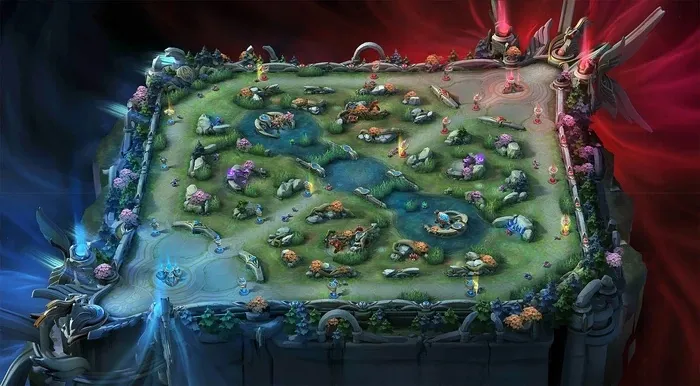
Drag tokens from the tray above onto the map
Mid Game
Objective fights & ganks
Team
Enemy
TeamEnemy
Drag tokens from the tray above onto the map
Late Game
Team fights & base push
Team
Enemy
TeamEnemy
Drag tokens from the tray above onto the map
Lane Assignments
0/5Mid
Roam
Jungle
EXP
Gold
Team Analysis
Select heroes to see team analysis
How to Plan Your MLBB Strategy
The MLBB Strategy Planner is a tactics board for planning team compositions and rotation routes across all three game phases. Start by assigning heroes to each lane in the side panel, then drag tokens onto the board to plan your team's positioning. Use the drawing tools to mark rotation routes, gank paths, and objective priorities, then export each phase to share with your squad. Whether you're preparing for a ranked match or coordinating with your 5-stack, planning your plays ahead of time gives your team a clear advantage from minute one.
1. Pick Your Heroes
Select heroes for both blue and red teams using the side panel. Check the radar chart to evaluate your team's balance across damage, durability, and crowd control.
2. Place Tokens on the Map
Drag hero tokens onto the early, mid, or late game map to show where each player should be positioned during that phase.
3. Draw Rotations
Use the drawing tools to mark rotation paths, gank timings, and objective priorities. Save each phase as a PNG to share with your team.
Pair this planner with the Draft Simulator to practice your ban/pick phase first, then plan your execution here. New to the battlefield? Brush up on lanes, jungle camps, and objective timers on the interactive MLBB map. Check hero tier lists for the current meta, or explore all hero guides for detailed matchup data. For official game mechanics and map updates, visit the Mobile Legends official site.
Build a Team Composition That Wins Fights
A winning Mobile Legends lineup balances three things: a frontline that can engage and soak damage, a backline that deals it, and enough crowd control to lock targets down. As you add heroes in the side panel, the radar chart updates to show your team's balance across damage, durability, and crowd control, so you can catch an all-damage, no-frontline draft before you ever load into a match.
Cover the core roles
Aim for a tank or roamer to engage, a gold-lane marksman or burst mage for damage, and a fighter or assassin to flank. A gap in the radar usually means a missing role.
Mix your damage
An all-physical or all-magic lineup is easy to itemize against. Blend physical and magic threats so the enemy cannot stack one defensive stat and shut you down.
Stack crowd control
Reliable chain CC wins teamfights and secures the Turtle and Lord. If your crowd-control score is low, swap a pick for a stun, knock-up, or suppression.
Want a deeper synergy and counter breakdown for your five picks? Build the roster in the Lineup Maker first, then bring the comp here to map out its movements.
A Tactics Board for Scrims and Coaching
Coaches and team captains use the planner as a shared whiteboard. Before a scrim, sketch your opening rotations and objective setups so everyone knows their job at minute one. Afterward, walk back through each phase board to review what went wrong and drill the fix. Because every phase exports as a PNG, the plan drops straight into Discord or a team chat and gets all five players on the same page before the draft even starts.
It works just as well for a solo-queue 5-stack: agree on who rotates for the first Turtle, who covers vision, and where you want to force the late-game Lord fight, then play from a plan instead of pinging in the moment.
Frequently Asked Questions
What is a strategy planner in MLBB?+
A strategy planner is a visual tool that lets you assign heroes to lanes, place tokens on the game map, and plan team rotations for early, mid, and late game phases. It helps teams coordinate movements and objectives before a match.
How do I plan and draw my team's rotations?+
Use the three game-phase boards (early, mid, late) to drag hero tokens into position. Draw arrows to sketch rotation routes between lanes, jungle camps, and objectives like the Turtle or Lord, then coordinate your roamer and jungler movements to set up ganks and secure objectives. Export each phase to share the plan with your team.
Can I save my MLBB strategy as an image?+
Yes. Click the download button on any individual phase map to save it as a PNG, or use the Save Maps button to export all three phases at once. Share the images with your team via Discord, WhatsApp, or any messaging app.
What is the difference between the strategy planner and draft simulator?+
The draft simulator focuses on the ban/pick phase, helping you practice hero selection order and counter-picks. The strategy planner picks up after the draft, letting you plan how your team will actually play the map with lane assignments and rotation paths.
Is the MLBB strategy planner free?+
Yes. The strategy planner is completely free and runs in your browser with no signup, download, or account required. You can build unlimited team compositions, draw rotation routes on all three phase boards, and export each phase as a PNG to share with your team.
How is the strategy planner different from the interactive map?+
The interactive map is a reference for learning the Land of Dawn layout, its lanes, jungle camps, and objective timers. The strategy planner is a tactics board where you build your own plan on top of that map: assign heroes to lanes, draw rotation and gank routes, and export the result. Use the map to learn the battlefield, then the planner to script your team's plays.